
Digital Literacy Through Blogging and Multimedia Writing
Sample Lesson 1: How to Start a Blog Safely and QuicklyPart 2 – Blog Building (how to build a blog at WordPress.com)
Activity 5: Start Your Blog on WordPress.com
For this activity, you are asked to use WordPress.com to host your blog. This is because it is both the most popular and the most versatile free blogging platform on the internet today. Furthermore, if you take time to learn the basics of blogging on a WordPress.com site, you will be well prepared to advance to a higher level of web development (and digital literacy), should you decide to use WordPress on a self-hosted site. For more information on the important differences between a WordPress.com blog and a self-hosted WordPress blog, please click here.
To get started with your WordPress.com blog, please watch the tutorial below. If possible, use two screens: put the video tutorial on one screen and the WordPress.com Setup Page on another. Then you can start and pause the video while building your blog at the same time.
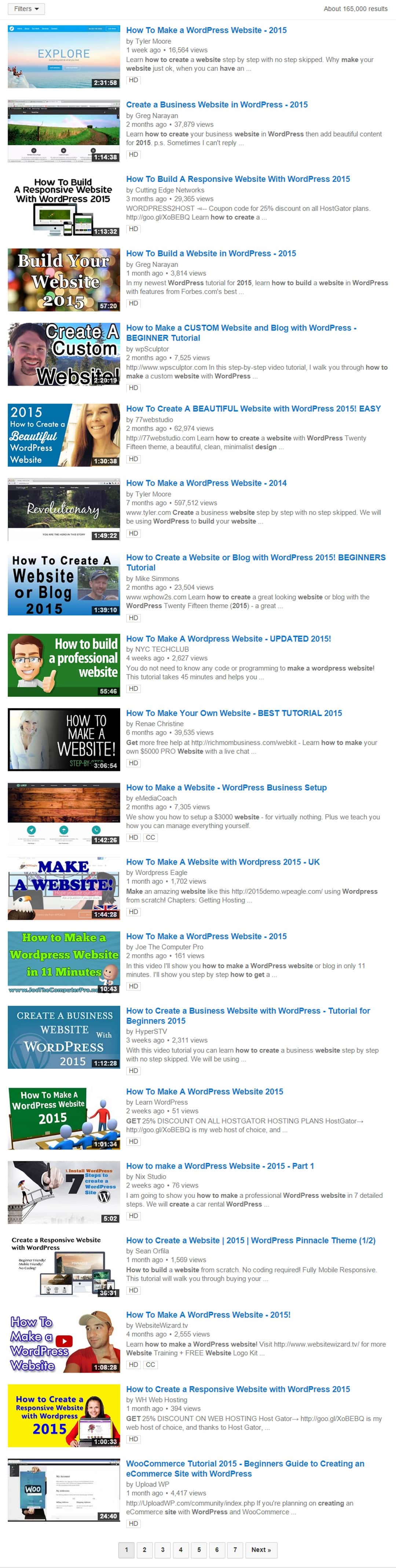
The total time for the tutorial to play (non-stop) is 7:21. This may seem like a long time, but compared to most other WordPress tutorials, it is a fraction of the usual time. Search for yourself on YouTube, if you wish–or just open the toggle below to see a screenshot of my recent search for current WordPress tutorials. I think you’ll agree that 7:21 is not so bad, after all!
Click this Toggle to See the Screenshot of a Recent Search for WordPress Tutorials, all of Which are VERY Long
Please note that most WordPress tutorials are at least 1 hour long.
(The tutorial that you are using is 7:28.)
After creating your blog, please move on to Activities 6 through 9. Please remember that, although you are creating individual blogs, you are expected to help one another in your groups. Activity 10 will be mainly group work and it will make up a significant portion of your final grade, so the sooner you begin to cohesively collaborate as a team, them better.
Good luck!
Activities 6-9: Add Pages, Pictures, Comments, Videos and Sharing to Your Blog
The following four tutorials show how to add pages and pictures, enable classmate commenting, embed videos, and share your blog in the Padlet space at the bottom of this page. To play the video you need, just use the control arrows on either side of the title slides. These new tutorials average about 4 and a half minutes each and provide you with all the information you need to build a beautiful blog. (And I will be using them in my real-life teaching practice.)
[srizonytalbum id=3]